Each profile keeps its own lists: what you want to watch, what you like, and what you have played. They follow you to every device and app you sign in to. Nobody else in the household sees them.
What counts as watched
When you stop playing, the server decides what to keep:
- Stopped in the first 5%: nothing is kept. A quick look does not count.
- Stopped between 5% and 90%: the title goes into Continue Watching, ready to resume.
- Past 90%: the title is marked watched.
A show or season counts as watched once every episode in it is.
To mark something yourself, use the tick on its page, or Mark as watched in a card’s ⋯ menu. Marking a show or season marks every episode in it.
- Mark as unwatched also forgets where you stopped.
- Remove from Continue Watching forgets where you stopped but keeps whether you watched it.
Watchlist
The watchlist is for things you mean to watch. Add a title with the bookmark on its page, or Add to watchlist in a card’s menu. Watchlist in the sidebar shows them, newest first.
- Only films and shows go on the watchlist. Adding a season or episode adds its show.
- Watching takes a title off. A film leaves once you have watched it, and a show once you have watched every episode.
Favourites
Favourites are titles you like. They stay there after you watch them. Add one with the heart on its page, or Add to favourites in a card’s menu. Anything can be a favourite, including a single episode or a collection.
Favourites in the sidebar groups them into Films, Shows, Seasons, Episodes, Collections and Extras, newest first.
Your watchlist and favourites also appear as rows on Home. See Home rows.
History
History lists everything you have played, newest first, grouped by day. Each entry shows when you started, where you stopped at, and how it reached you:
- Direct play: the file was sent as it is.
- Direct stream: the picture was sent as it is, with small changes so the browser could play it.
- Transcode: the server converted it as it played.
Download history saves every play you have made as a CSV file, which a spreadsheet opens and services such as Trakt can import. Each row is one play, the latest first, with these columns:
| Column | What it holds |
|---|---|
started_at, stopped_at | When the play started and stopped, in UTC, such as 2026-10-01T20:00:00Z. |
profile | Whose play it was. |
kind | movie or episode. |
title, year | The film’s or episode’s title, and a film’s year. |
show_title, season, episode | Which show an episode is of, and where in it. |
position_ms | Where the play stopped, in milliseconds. |
method | direct, remux or transcode: direct play, direct stream or transcode. |
tmdb_id, tvdb_id, imdb_id | The film’s ids at TMDB, TheTVDB and IMDb, or for an episode its show’s. Empty where it was never matched there. |
The file does not say whether a play was finished, as photon-server keeps only where it stopped.
An admin can see everyone’s history in Settings › Server › Play history, and download it there the same way: everyone’s, or the profile chosen under Who. See signed-in devices and what is playing now. You can also bring in your history from Plex, Jellyfin or Emby.
Calendar
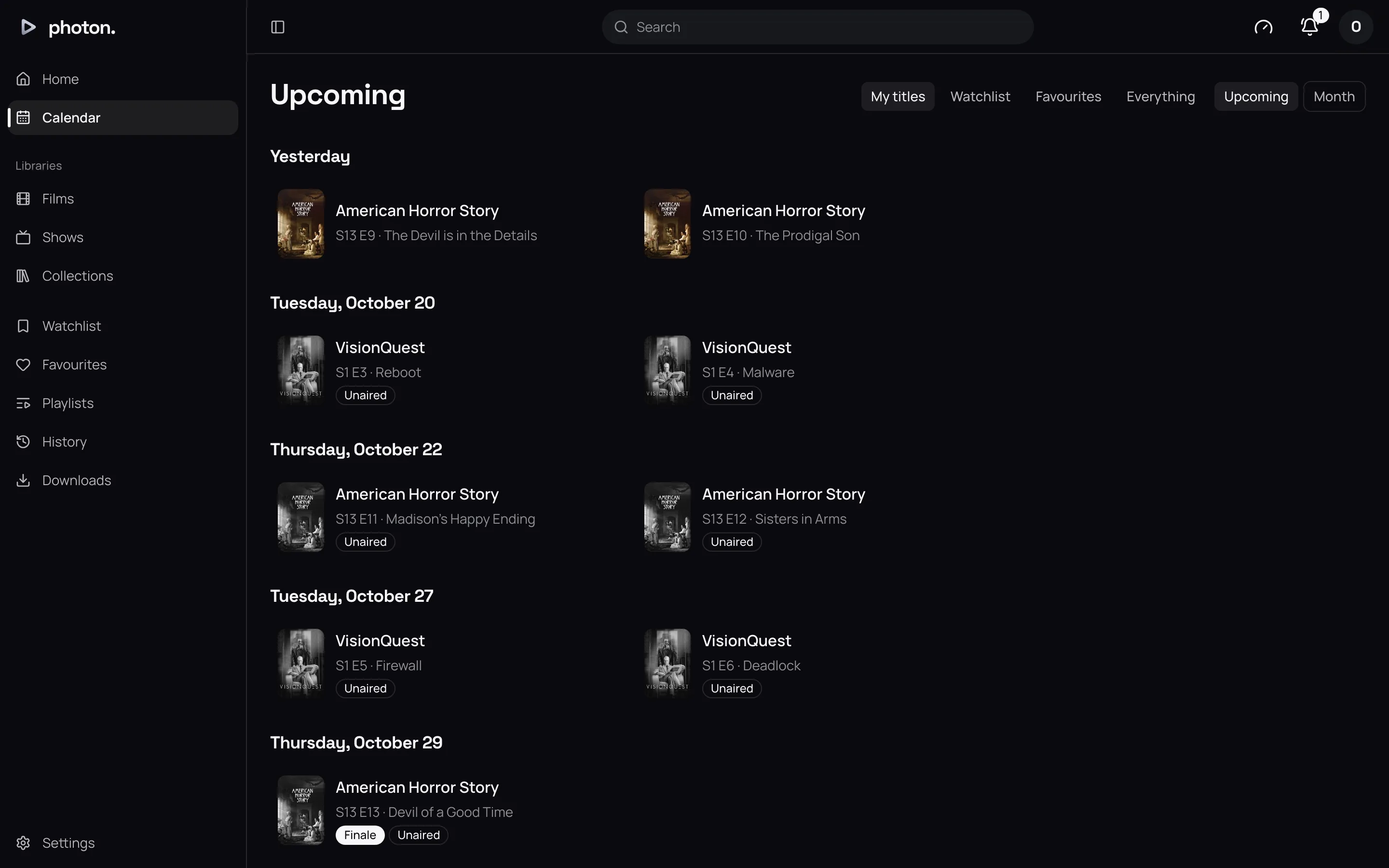
Calendar shows films being released and episodes airing, day by day. It includes episodes you do not have yet.
It opens on Upcoming: six weeks starting yesterday, with days headed Yesterday, Today, Tomorrow or by date. Month shows a month as a grid, with buttons for the previous and next month and Today to come back.
Choose whose titles it shows:
| Filter | What it shows |
|---|---|
| My titles | The default. Shows you have started, and titles on your watchlist or favourites. |
| Watchlist | Only your watchlist. |
| Favourites | Only your favourites. |
| Everything | Every film and show you can see. |
Choose an entry to open its title. An episode you do not have yet is greyed out and marked Unaired, or Missing once its air date has passed. Episodes are also marked Series premiere, Season premiere or Finale. Anything you have watched is dimmed.