photon-server does a lot by itself: it scans your libraries, refreshes what it knows about titles, backs up its database, and more. You can see all of it, run it now, or stop it, under Settings › Server.
- Scheduled tasks run on a timetable.
- Many tasks split their work into jobs, one per library, title or file, which the server works through in the background.
- The maintenance window is the time of night when the heaviest jobs, the ones that read whole video files, are allowed to run.
Scheduled tasks
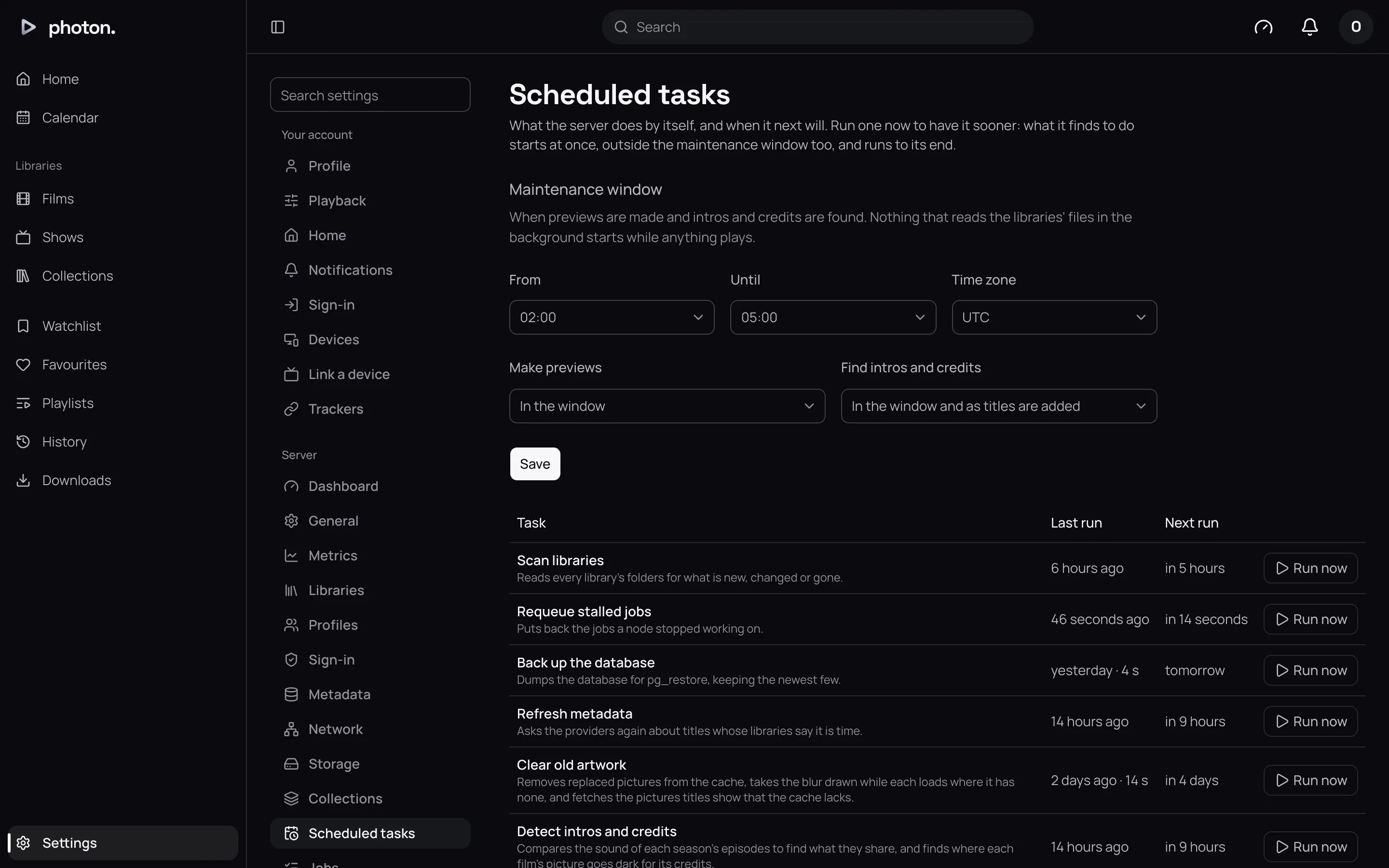
Settings › Server › Scheduled tasks lists each task, when it last ran and how it ended, and when it runs next.
| Task | What it does | When |
|---|---|---|
| Scan libraries | Looks in every library’s folders for what is new, changed or gone. | Every 12 hours |
| Requeue stalled jobs | Puts back work a server stopped part way through. | Every minute |
| Back up the database | Makes a backup, keeping the newest three. | Every 3 days |
| Refresh metadata | Updates titles’ details from the online providers, when their library says it is time. | Daily at 03:00 |
| Clear old artwork | Removes pictures no longer used, and fetches any that are missing. | Every 7 days |
| Detect intros and credits | Finds where intros and credits start and end, so they can be skipped. | Daily, as the maintenance window opens |
| Make previews | Makes chapter pictures and the previews shown while you scrub. | Daily, as the maintenance window opens |
| Clear old downloads | Forgets downloads past their week. | Every hour |
| Prune the activity log | Forgets activity older than 30 days. | Every day |
| Refresh smart collections | Updates what each smart collection holds. | Every 15 minutes |
| Sync list collections | Reads each list collection’s online list again. | Every day |
| Download missing subtitles | Fetches subtitles in the languages a library asks for. | Every day |
| Refresh the anime lists | Reads the lists that match anime to the right seasons again. | Every day |
Refresh metadata runs at 03:00 in the server’s own time zone. A task missed while the server was off runs at the next chance.
Run a task now
Choose Run now beside a task. It starts as soon as it isn’t already running, and its work starts at once, even outside the maintenance window.
Stop a task
The four tasks that queue jobs (Scan libraries, Refresh metadata, Detect intros and credits and Make previews) show their progress while they run, such as “42% · 1,260 of 3,000 · 1 running”, and a Stop button. Stopping keeps what is done. The next run picks up the rest.
Jobs
Settings › Server › Jobs shows how much work is waiting, by kind, and lists any work the server has given up on.
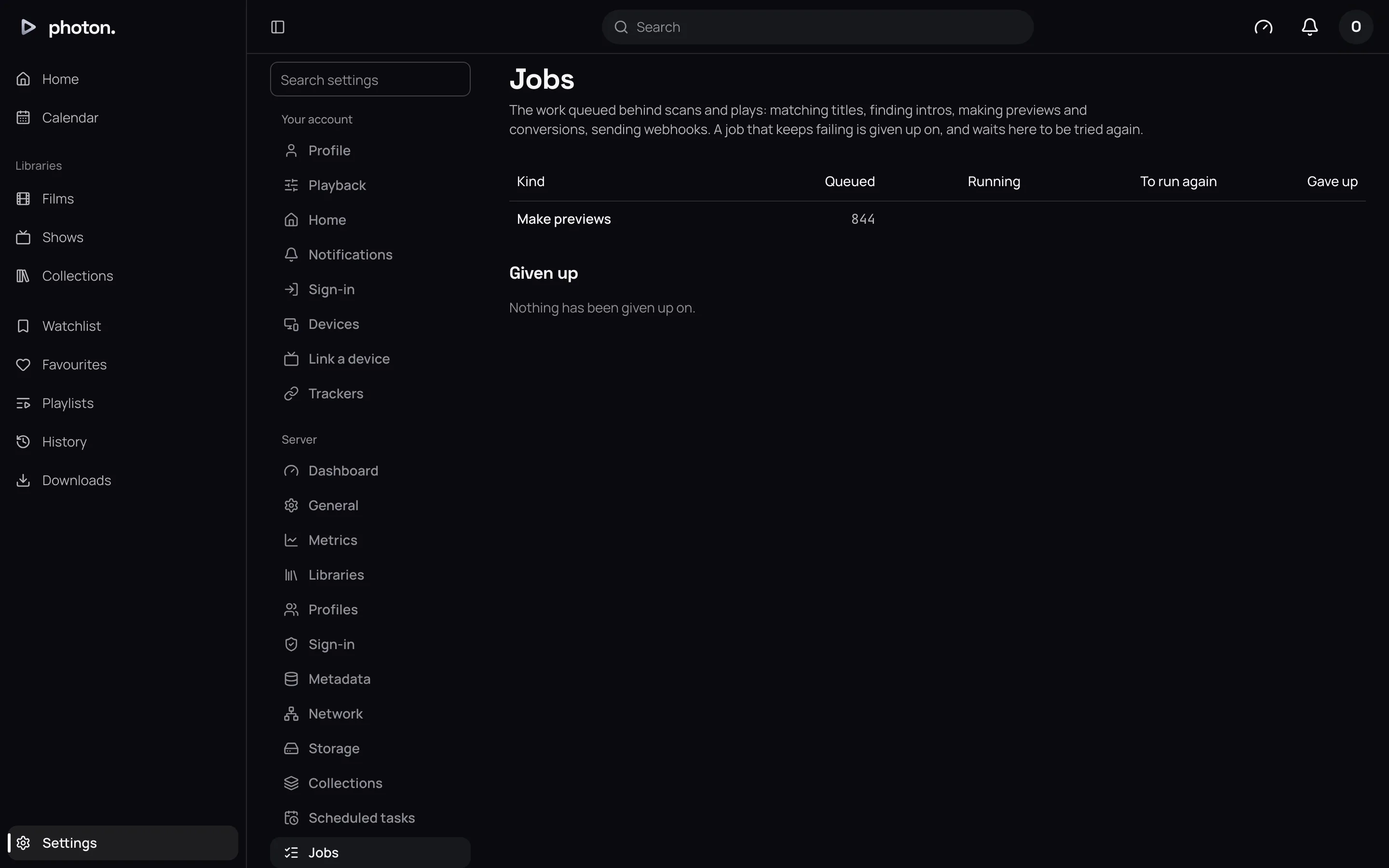
When a job fails, the server tries again, waiting longer each time, up to five times. After the fifth, it gives up:
- Settings › Server › Dashboard shows it under Needs attention.
- It is listed under Given up on Settings › Server › Jobs, with its last error.
- Choose Try again to give it five more attempts. It is also tried again by itself if what it was working on changes.
The maintenance window
Some jobs read whole video files: making previews, finding intros and credits, and reading media details. Reading a whole file uses the same disk or network drive a film is played from, and several at once can make playback stutter. So these jobs:
- never start while anything is playing, and stop when someone presses play, to be tried again later;
- wait for the maintenance window, if they were queued for it.
Set the window at the top of Settings › Server › Scheduled tasks, under Maintenance window, then choose Save.
| Setting | What it does |
|---|---|
| From | The hour the window opens. 02:00 by default. |
| Until | The hour it closes. 05:00 by default. An hour earlier than From runs past midnight. |
| Time zone | The time zone of those hours, such as Europe/London. UTC by default. |
| Make previews | In the window, the default: previews for new titles wait for the window. In the window and as titles are added: they are made straight away. |
| Find intros and credits | In the window and as titles are added, the default: new titles are checked straight away. In the window: they wait. |
A library with previews or intros and credits switched off in its own settings makes none, whatever this says.
Tip: Run now ignores the window. Use it when you want previews or intros found today rather than tonight.
Good to know
- Matching, scans, webhooks, notifications, imports and download conversions don’t wait for the window or for playback. Someone is waiting for each.
- With several servers, scheduled tasks run on one at a time, and every server works through the jobs.
- Some tasks also start by themselves when needed. For example, a scan that adds titles fetches their missing subtitles straight away.